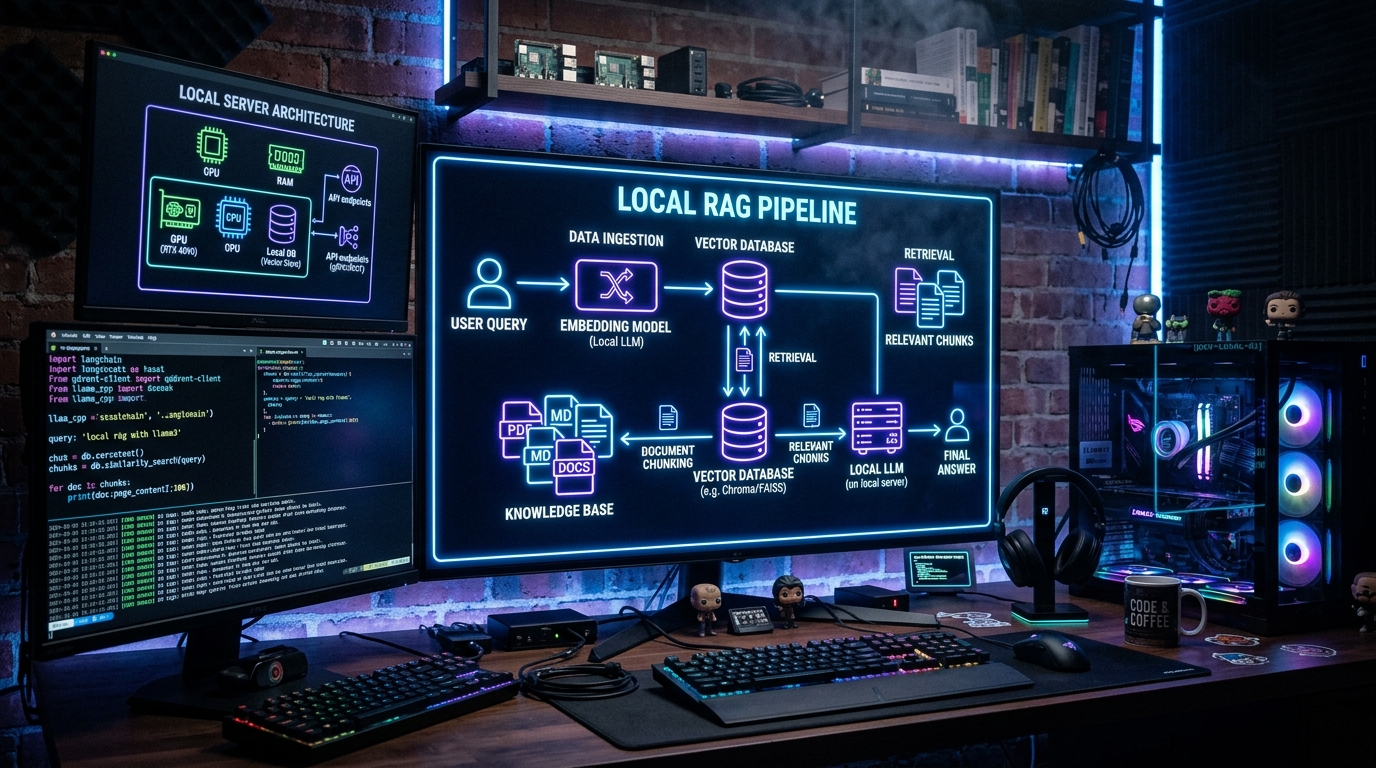
TL;DR: Build a fully local RAG (Retrieval-Augmented Generation) pipeline using Ollama for LLMs, ChromaDB for vector storage, and LangChain for orchestration — no cloud APIs, no API keys, no data leaving your machine. Step-by-step with complete runnable code.
If you are weighing Ollama against the alternatives, our comparison database keeps a live scorecard of how the leading Local LLM tools stack up.
Last updated: May 12, 2026
What You'll Build
By the end of this guide, you'll have a RAG pipeline that lets you ask questions about your own documents — PDFs, text files, code, anything — and get answers grounded in that data. The entire system runs on your machine. No data ever leaves your computer.
RAG works in two phases. First, ingestion: your documents are split into chunks, converted into vector embeddings, and stored in a vector database. Then, retrieval + generation: when you ask a question, the system finds the most relevant document chunks, injects them into an LLM prompt as context, and generates an answer grounded in your data. This dramatically reduces hallucinations compared to asking the LLM directly.
Prerequisites
- A computer with at least 8GB RAM (16GB recommended)
- Python 3.10+ installed
- 10-15 minutes of setup time
Step 1: Install Ollama and Pull Models
Download and install Ollama from ollama.ai. Then pull the models you need:
class="language-bash"># An LLM for answering questions ollama pull llama3.1:8bAn embedding model for converting text to vectors
ollama pull nomic-embed-text
Verify both are installed
ollama list
Step 2: Set Up the Python Environment
class="language-bash">mkdir local-rag && cd local-rag
python3 -m venv venv
source venv/bin/activate # On Windows: venv\Scripts\activate
pip install langchain langchain-chroma langchain-ollama pypdf sentence-transformers
Step 3: Ingest Your Documents (index.py)
Create index.py — this script loads documents, splits them into chunks, embeds them, and stores them in ChromaDB using the LangChain framework:
class="language-python">import os from langchain.text_splitter import RecursiveCharacterTextSplitter from langchain_community.document_loaders import TextLoader, PyPDFLoader from langchain_community.vectorstores import Chroma from langchain_community.embeddings import OllamaEmbeddingsDOCS_DIR = “docs” CHROMA_DIR = “chroma_db” EMBED_MODEL = “nomic-embed-text”
os.makedirs(DOCS_DIR, exist_ok=True) print(f”Place your .txt and .pdf files in ./{DOCS_DIR}/”)
def load(): docs = [] for root, _, files in os.walk(DOCS_DIR): for f in files: path = os.path.join(root, f) if f.endswith(“.txt”): docs.extend(TextLoader(path).load()) elif f.endswith(“.pdf”): docs.extend(PyPDFLoader(path).load()) return docs
def split(docs): splitter = RecursiveCharacterTextSplitter(chunk_size=800, chunk_overlap=80) return splitter.split_documents(docs)
def embed(splits): embeddings = OllamaEmbeddings(model=EMBED_MODEL) db = Chroma.from_documents(splits, embeddings, persist_directory=CHROMA_DIR) print(f”Indexed {len(splits)} chunks to {CHROMA_DIR}/”)
if name == “main”: print(“Loading documents…”) docs = load() print(f”Loaded {len(docs)} document(s)”) chunks = split(docs) embed(chunks)
Step 4: Query Your RAG Pipeline (query.py)
Create query.py — this loads the vector store and runs the RAG chain:
class="language-python">from langchain_community.vectorstores import Chroma from langchain_community.embeddings import OllamaEmbeddings from langchain_community.chat_models import ChatOllama from langchain_core.prompts import ChatPromptTemplate from langchain_core.output_parsers import StrOutputParser from langchain_core.runnables import RunnablePassthroughCHROMA_DIR = “chroma_db” EMBED_MODEL = “nomic-embed-text” LLM_MODEL = “llama3.1:8b”
template = """Answer the question based only on the context below. If you don’t know, say you don’t know. Be concise.
Context: {context} Question: {question} Answer:"""
def build_chain(): embeddings = OllamaEmbeddings(model=EMBED_MODEL) db = Chroma(persist_directory=CHROMA_DIR, embedding_function=embeddings) retriever = db.as_retriever(search_kwargs={“k”: 3}) llm = ChatOllama(model=LLM_MODEL, temperature=0) prompt = ChatPromptTemplate.from_template(template) return ( {“context”: retriever, “question”: RunnablePassthrough()} | prompt | llm | StrOutputParser() )
if name == “main”: chain = build_chain() print(“RAG ready! Ask questions about your documents.”) while True: q = input(“\nYou: ”) if q.lower() == “exit”: break print(f”Agent: {chain.invoke(q)}“)
Step 5: Run It
class="language-bash"># First, place your documents in ./docs/ echo "RAG is a technique that improves LLM answers by retrieving relevant context from a knowledge base before generating a response." > docs/rag-intro.txtIndex your documents
python index.py
Query your documents
python query.py
Try asking: What is RAG? — it will answer based on your document, not from the LLM's training data. Add more files to docs/ and re-run index.py to expand your knowledge base.
Performance Tips
- Chunk size matters. 800 characters with 80 overlap is the sweet spot for most documents. Smaller chunks (400) improve precision for specific lookups. Larger chunks (1200+) work better for summarization tasks.
- Use a dedicated embedding model.
nomic-embed-text— the model behind the Ollama tag — works well for general text. For code, trycodebert. For multilingual, useintfloat/multilingual-e5-small. - Retrieve more for complex questions. Increase
kfrom 3 to 5-7 for questions that require synthesizing information across multiple documents. - Add metadata filtering. ChromaDB supports filtering by metadata fields. Tag your documents with source, date, or category for targeted retrieval.
FAQ
How is this different from the local AI agent guide?
The ReAct agent guide builds an agent that uses tools to solve problems. RAG is a specific technique for grounding LLM answers in your data. They work well together — a ReAct agent can use RAG as one of its tools to answer questions about documentation.
Can I use a different vector database?
Yes. LangChain supports FAISS (in-memory, fast for small datasets), Qdrant (self-hosted or cloud), Weaviate, Pinecone, and others. ChromaDB is the easiest for local setups because it persists to disk automatically and requires no server.
How do I update documents after indexing?
Delete the chroma_db/ directory and re-run index.py. For incremental updates, use ChromaDB's update_document method with a document ID. See the ChromaDB docs for details.
Does this work with PDFs?
Yes. The PyPDFLoader extracts text from PDF files. For scanned PDFs (images), you'll need to add OCR via pytesseract or unstructured[pdf].
Can I deploy this as a web service?
Yes. Wrap query.py in a FastAPI or Flask endpoint. Add a simple HTML frontend with Streamlit or Gradio for a chat-like interface.
Built a RAG pipeline? Share your setup in the comments or tag us on X. For more local AI projects, see our full ReAct agent guide and our prompt caching tip.
Tags: Guides, AI, Open Source, Productivity, Tutorials
Tool: Ollama / ChromaDB / LangChain / nomic-embed-text
Dig deeper: Ollama review · Together AI review.
Back to all posts